
Player
Overview
The Dailymotion Player is a state-of-the-art video player built with the latest web technologies (HTML5/JavaScript) and video standards (HLS adaptive streaming).
It’s easy to use, cross-platform friendly and enjoyed by millions of users every day both on Dailymotion’s properties and hundreds of our premium Partners websites and native applications.
The Player is customizable, consistent across all devices, delivered with Picture-in-Picture, extensive analytics and the necessary advertising infrastructure out of the box.
We have opened a CodePen developer account to provide access to some code samples that will allow you to discover the Dailymotion Player and its features, check it out here.
Integration methods
Depending on your needs you can integrate the Player using one of the methods outlined below. We recommend where possible to embed using one of the libraries in order to take full advantage of our Player technology.
| Integration | Info | Access to Player API |
|---|---|---|
| Player Embed Script | Embed using JavaScript, the single line script will load the Player at the point where you add it to the HTML page | Yes |
| Player Library Script | Add just the player JavaScript library to create players programmatically | Yes |
| Player iFrame | The iFrame embed method is the most basic way to integrate the Player. Advanced functionality such as PiP and firstTimeView will not be available | No |
| Android SDK | The SDK is a thin wrapper around a WebView that allows to easily embed the Player into an Android application | Yes |
| iOS SDK | A Swift wrapper around the WKWebView Class that allows developers to easily embed the Player in iOS applications | Yes |
| Amp | The Dailymotion AMP component is available to embed the Player with the AMP framework | No |
Embed the player on web
Embedding the player on your properties is simple. There are different integration methods available depending on your technical preference or environment. We recommend using one of the script embeds type where possible as it provides access to all player functionality and the Player API.
| Embed type | Info |
|---|---|
| Player Embed Script | Embed using JavaScript, the single line script will load the Player at the point where you add it to the HTML page. This also provides access to the Player API |
| Player Library Script | Add just the library and create the player programmatically using the Player API |
| Player iFrame | Embed the player without JavaScript to use a basic player configuration. Advanced functionality such as PiP and firstTimeView will not be available |
Getting started
As a first step you need to create a custom player configuration associated with your Dailymotion account and defined by a unique Player ID.
1 – Create a custom Player configuration
A custom player configuration can be created and managed either through the “Players” tab in the Dailymotion Studio or programmatically via the player REST API.
A Player configuration is composed of several settings. These settings can’t be modified or overridden at run time. They can only be updated via the Player configurator in the Dailymotion Studio or the Player REST API.
For more information on the settings that are available, please refer to the section “Player settings” .
2 – Add the Player or Player Library
Once a Player configuration is created you can access the corresponding scripts that can be embedded into your properties. Embed scripts can be accessed either from the “Players” tab within the Dailymotion Studio or programmatically via the player REST API.
The following integration types are available to use the Player on the web:
| Embed type | Info |
|---|---|
| Player Embed Script | Embed using JavaScript, the single line script will load the Player at the point where you add it to the HTML page. This also provides access to the Player API |
| Player Library Script | Add just the library and create the Player programmatically using the Player API |
| Player iFrame | Embed the player without JavaScript to use a basic player configuration |
Player Embed Script
The Player Embed Script integration method is the easiest way to embed the Player with the library on your site and provides access to the Player API. It is a single-line script that loads the Player exactly where it is added into the <body> of the page.
Embed a video
After adding the Player embed script, use the data-video attribute to specify which video ID to load. It should be added directly to the script tag that loads the pre-configured Player. To ease integration it’s already added to the embed script that can be copied via the Dailymotion Studio and requires only a video Id to be defined.
<script src="https://geo.dailymotion.com/player/{Player ID}.js" data-video="x84sh87"></script>
Embed a playlist
After adding the Player embed script, use the data-playlist attribute to specify which playlist ID to load. It should be added directly to the script tag that loads the pre-configured player.
<script src="https://geo.dailymotion.com/player/{Player ID}.js" data-playlist="x5zhzj"></script>
<script src="https://geo.dailymotion.com/player/{Player ID}.js" data-playlist="x79dlo" data-video="x7tgad0"></script>
Embed multiple players
To use multiple Player configurations on a single page just add different embed scripts specifying their unique Player IDs.
			<!-- Player 1 -->
<script src="https://geo.dailymotion.com/player/{Player ID}.js"   data-video="x84sh87"></script>
<!-- Player 2 -->
<script src="https://geo.dailymotion.com/player/{Player ID}.js"   data-video="x84sh87"></script>
Player Library Script
The Player library script is available for developers who want to load just the library, the Player can be then loaded programmatically via the Player API. The Player library URL can be either copied from the Dailymotion Studio in the Player’s tab or retrieved from the REST API (see lib_script_url field).
Any Player created with the Player API will carry over the configuration corresponding to the Player ID embedded in the Player library script. Additional player configurations can be specified in the createPlayer() method using the player parameter.
It takes only 3 steps to load our player using the Player library script:
1. Add the Player library script to your HTML page
Add the library script within the <body> section of the page. This provides access to the Player API and allows you to create a Player instance programmatically. It should be added before any code that interacts with the Player API is loaded.
			<body>
  <script src="https://geo.dailymotion.com/libs/player/{Player ID}"></script>
</body>
2. Add a placeholder for the player
Add a div placeholder on the page where you want the player(s) to be loaded and assign an id to the container which will be required in the createPlayer() method.
<div id="my-dailymotion-player">My Player placeholder</div>
3. Create the Player using the Player API
Use the createPlayer() method and pass in the assigned container id to initialize the player, specify the video, playlist and parameters to be loaded. You can also specify a player configuration to use with the player attribute in order to load a different player configuration, by default the configuration of the embedded library will be applied.
It is recommended when adding only one single Player on a page, allow for the Player configuration to be specified in the lib_script_url rather than the createPlayer() method.
			<body>
  <script src="https://geo.dailymotion.com/libs/player/{Player ID}"></script>


<div id="my-dailymotion-player">My Player placeholder</div>

<script>
  dailymotion
    .createPlayer("my-dailymotion-player", {
      video: "x84sh87",
  })
  .then((player) => console.log(player))
  .catch((e) => console.error(e));
</script>
</body>
Embed a video
After loading the Player Library script use the createPlayer() method and pass in the container id to initialize the Player and specify the video to be loaded. The Player configuration specified in the embedded library script will apply to every created player.
The video must be specified using the video attribute.
Embed a playlist
Use the createPlayer() method and pass in the container id to initialize the player as well as the playlist Id to be loaded. The Player configuration specified in the embedded library script will apply to every created player.
The playlist must be specified using the playlist attribute.
Embed multiple players
Any Player created with the Player API will carry over the configuration corresponding to the embedded Player library script.
If it is required to load multiple Players with different configurations on a single page, other Player IDs can be specified in the createPlayer() method using the 'player' parameter. Therefore any number of Player configurations can be embedded with only a single-Player library URL.
If the Player ID is incorrectly specified or does no longer exist the configuration will fall back to a default library configuration. If multiple player scripts are loaded on a page but no player is specified via the createPlayer() method, an error will be logged and the created player will take a default config.
Player iFrame
Embed a partially configured player without JavaScript. Smart player functionality such as “Picture-in-Picture”, “first time viewable” and “auto-sizing” along with access to the Player API won’t be available. The iFrame Player will benefit only from basic UI customizations specified in the Player configurator UI or Rest API. We recommend Partners take full advantage of our Player technology and use the Player embed scripts.
Embed a video
Use the video param in the src:
			<iframe frameborder="0" width="640" height="360"
    src="https://geo.dailymotion.com/player/{Player ID}.html?video=x84sh87"
    allowfullscreen
    allow="autoplay; fullscreen; picture-in-picture">
</iframe>
Embed a playlist
Use the playlist param in the src:
			<!-- Replace the Player ID and Playlist ID with your own -->
<iframe frameborder="0" width="640" height="360"
    src="https://geo.dailymotion.com/player/{Player ID}.html?playlist={Playlist ID}"
    allowfullscreen
    allow="autoplay; fullscreen; picture-in-picture">
</iframe>
Embed the player in native apps
Our Mobile SDK provides access to the Player API and gives you full control of the player. Along with having a genuine native feel, it’s possible to use our provided tools, to build a unique video solution in your app, benefiting from your own custom UI components and aligning it with the look and feel of your brand.
As our SDKs are open source, Partners can make a pull request to update the iOS or Android SDK. Please check the source code, documentation and sample app on GitHub.
| Integration | Info | Access to Player API |
|---|---|---|
| Android SDK | The SDK is a thin wrapper around a WebView that allows you to easily embed Dailymotion videos into your Android application | Yes |
| iOS SDK | A Swift wrapper around the WKWebView class that allows developers to easily embed the Dailymotion Player in their app | Yes |
Android SDK
iOS SDK (Swift)
Overview
The iOS SDK allows you to easily embed Dailymotion videos into your iOS application.
Supported versions & requirements
| Swift 5+ |
| iOS 14+ |
| Xcode 14+ |
Key features
- Remote Player management
- iOS 16 support
- Verified Google IMA support
- OMSDK support
- Sample Player applications & code samples
- Fullscreen playback management
- Fully-featured Player API to access Player events, state and native like control
Sample applications
To help you learn about our iOS SDK and to facilitate testing, discover our sample SDK applications.
- iOS sample app: Download the sample app here directly on your device and explore the functionalities of the SDK in a user-friendly UI
- Source code: Access the source code of the sample app here, customize as you wish and easily integrate the SDK into your projects
Implementations steps
Getting started
1 – Create an iOS Player configuration
As a first step you need to create a custom Player configuration for your iOS application in your Dailymotion account. A unique Player Id will be generated which will be required for Player initialization in-app, accurate monetization, targeting and attribution.
The custom Player configuration can be created and managed either through the “Players” tab in the Dailymotion Studio or programmatically via the Player REST API.
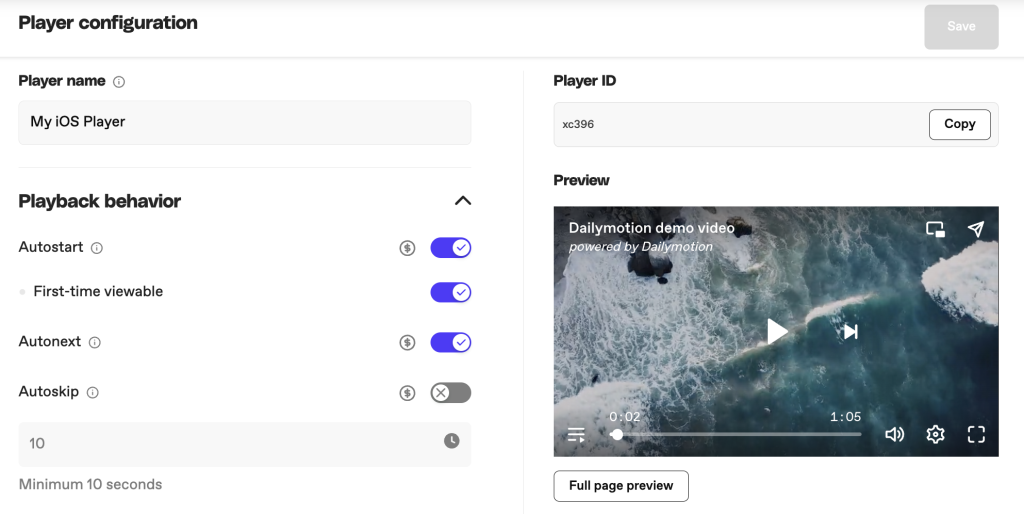
Note: Please note “Picture-in-Picture”, “First time viewable”, “Aspect ratio” and “Use embedder link when sharing” features won’t be available and are reserved for JavaScript embeds.
2 – Add the SDK to your Project
Using the Swift Package Manager
The Swift Package Manager is a tool for automating the distribution of Swift code and is integrated into Xcode and the Swift compiler.
- Click
File - Click
Add Packages... - Specify the git URL for Dailymotion iOS SDK: https://github.com/dailymotion/player-sdk-ios
Implement it manually
- Clone the Dailymotion iOS SDK git : https://github.com/dailymotion/player-sdk-ios
- Copy the
Frameworksfolder from the cloned git into your project - From Xcode select your project
- Select
GeneralTab - Expand
Frameworks, Libraries,andEmbeddedContent section - Open previous copied
Frameworksfolder
Select Drag and Drop into Frameworks, Libraries, and Embedded section the .xcframework found in the directories DailymotionPlayer and AdvertisingFramework found there.
The frameworks added to the project target should be :
DailymotionPlayerSDK.xcframeworkDailymotionAdvertisingServices.xcframeworkGoogleInteractiveMediaAds.xcframeworkOMSDK_Dailymotion.xcframework
Now you can build your project 🚀
3 – Create & Add a Player view
Import Dailymotion SDK
			import DailymotionPlayerSDK
import AVFoundation
import UIKit

class ViewController: UIViewController {
// Container View IBOutlet - host view for the player
  @IBOutlet weak var playerContainerView: UIView!
...
Create the Player view and Add it to view hierarchy – Closure
			// Please replace the player id with your own Player ID accessed via the Dailymotion Studio or REST API.
    Dailymotion.createPlayer(playerId: <#"xbzlf"#>, videoId: <#"x84sh87"#>, playerParameters:  DMPlayerParameters() , playerDelegate: self) { [weak self] playerView, error in
// Wait for Player initialisation and check if self is still allocated
      guard let self = self else {
        return
      }
      // Check For errors
      if let error = error {
        print("Error creating player: \(error)")
      } else {
        guard let playerView = playerView else {
          return
        }
        // Attach the created Player View to your player container View
        let constraints = [
          playerView.topAnchor.constraint(equalTo: self.playerContainerView.topAnchor, constant: 0),
          playerView.bottomAnchor.constraint(equalTo: self.playerContainerView.bottomAnchor, constant: 0),
          playerView.leadingAnchor.constraint(equalTo: self.playerContainerView.leadingAnchor, constant: 0),
          playerView.trailingAnchor.constraint(equalTo: self.playerContainerView.trailingAnchor, constant: 0)
        ]
        // Activate created constraints
        NSLayoutConstraint.activate(constraints)
      }
    }
Create the Player view and Add it to view hierarchy – Async/Await
			do {
      // Please replace the Player ID with your own Player ID accessed via the Dailymotion Studio or REST API.
      let playerView = try await Dailymotion.createPlayer(playerId: <#"xbzlf"#>, videoId: <#"x84sh87"#>, playerParameters:  DMPlayerParameters() , playerDelegate: self)
      // Attach the created Player View to your player container View
      let constraints = [
        playerView.topAnchor.constraint(equalTo: self.playerContainerView.topAnchor, constant: 0),
        playerView.bottomAnchor.constraint(equalTo: self.playerContainerView.bottomAnchor, constant: 0),
        playerView.leadingAnchor.constraint(equalTo: self.playerContainerView.leadingAnchor, constant: 0),
        playerView.trailingAnchor.constraint(equalTo: self.playerContainerView.trailingAnchor, constant: 0)
      ]
      // Activate created constraints
      NSLayoutConstraint.activate(constraints)
    }
    catch {
      // Handle erros
      print("Error creating player: \(error)")
    }
}
Implement DMPlayerDelegate :
In order to get full functionality and benefit frorm full monetization, implementing DMPlayerDelegate is mandatory.
			extension ViewController: DMPlayerDelegate {
func player(_ player: DMPlayerView, openUrl url: URL) {
    UIApplication.shared.open(url)
  }

  func playerWillPresentFullscreenViewController(_ player: DMPlayerView) -> UIViewController {
    return self
  }

  func playerWillPresentAdInParentViewController(_ player: DMPlayerView) -> UIViewController {
    return self
  }
}
Initialization methods
| Name | Info | Example |
| Create Player | To create the player object DMPlayerView, the object will be returned in the completion closure given as a parameter. Player ID is mandatory and can be created and managed on Dailymotion Studio | Dailymotion.createPlayer(playerId: "PLAYERID", videoId: "VIDEOID", playerParameters: DMPlayerParameters() , playerDelegate: self) |
Required configuration methods
After configuring the initialization of the player, it is required to implement the necessary methods of the protocol DMPlayerDelegate to ensure your application can manage the player in all contexts.
| Info | Example |
| Informs the delegate that the app has to open a URL in a browser result as a user action | |
| Asks the delegate for a UIViewController to present the player in fullscreen | playerWillPresentFullscreenViewController(_:) |
| Asks the delegate for a UIViewController to display an Ad dependent by a UIViewController | playerWillPresentAdInParentViewController(_:) |
API Reference
Using Player Parameters
Additional runtime customization is achievable when embedding the Player using client-side parameters from the table below. These parameters allow you to specify additional Player behavior or pass in required values to a specific Player embed.
| Name | Parameter | Default | Description | Values | Type |
|---|---|---|---|---|---|
| Video ID | video | nil | The ID of the video to load | – | String |
| Playlist ID | playlist | nil | The ID of the playlist to load | – | String |
| Advertising Config | customConfig | nil | For passing in unique keys for advertising purposes. See how to configure customConfig. | – | Dictionary [String:String] |
| Scale mode | scaleMode | fit | To adjust the player’s video focus | "fit", "fill", "fillLeft", "fillRight", "fillTop" & "fillBottom" | Enum |
| Mute | mute | false | To mute the player | "true","false" | Boolean |
| Start | startTime | 0 | Specify the time (in seconds) from which the video should start playing | – | Number |
| Loop | loop | false | To set the video to loop. Check dedicated section for more details. | "true","false" | Boolean |
| Default Orientation | defaultFullscreenOrientation | landscapeLeft | Default player orientation when user interacts with fullscreen button | landscapeRight, landscapeLeft, portrait, upsidedown | Enum |
Example of using Player Parameters.
var dmPlayerParameters = DMPlayerParameters()
dmPlayerParameters.customConfig = ["keyvalues":"category=sport§ion=video", "dynamiciu":"USERID/12345"]
dmPlayerParameters.allowIDFA = true
dmPlayerParameters.allowPIP = true
dmPlayerParameters.defaultFullscreenOrientation = .landscapeRight
dmPlayerParameters.mute = false
dmPlayerParameters.scaleMode = .fit
dmPlayerParameters.startTime = 0
dmPlayerParameters.loop = false
Dailymotion.createPlayer(playerId: "PlayerId", playerParameters: dmPlayerParameters, logLevels: [.all]) { playerView, error in
}
Player methods
When the player is loaded you can use the below methods to take full control of the player and interact with it programmatically.
| Method | Info | Type |
loadContent(videoId:playlistId:startTime:) | To load a video or a playlist. You can play a specific video followed by a playlist by specifying both the video and playlist IDs Note that the loaded content playback is based on the autostart configuration defined in the PlayerID settings | String?, |
play() | To play video playback | |
pause() | To pause video playback | |
setFullscreen() | To enable or disable fullscreen mode with fullscreen: true, or falseIf fullscreen: true, fullscreen orientation is by default orientation: .landscapeLeftOther available values for orientation are .landscapeRight, .upsidedown and .portrait | Example: setFullscreen(fullscreen: true, orientation: .landscapeRight) |
setSubtitles(code:) | To activate a subtitles track to a specified language if available | String |
setQuality(level:) | To set the video’s quality to the specified quality | String |
seek(to:) | To seek to the specified time in video playback in seconds | TimeInterval |
setMute(mute:) | To set the mute mode of the player | Bool |
setCustomConfig(config:) | To set the config for ads Dynamically update the advertising parameter value, use the method to send a new value which then gets updated when the player loads the next video file | Dictionary [String:String] |
setScaleMode(config:) | To adjust the player view of the video screen"fit", "fill", "fillLeft", "fillRight", "fillTop"& "fillBottom" | ScaleMode |
getState(completion:) | To retrieve the current state of the player | StateCompletionHandler |
try await getState() | To retrieve the current state of the player | |
updateParams(params:) | To change the following player config values at runtime scaleMode, mute, volume, enableControls & customConfig | DMPlayerParameters |
Events
Player events – DMPlayerDelegate
| Event | INFO |
player(_:openUrl:) | Informs the delegate that has to open a URL in a browser result as a user action |
player(_:didFailWithError:) | Sent when the player triggers an error. |
playerDidStart(_:) | Sent the first time the player attempts to start the playback, either because of user interaction, an autoplay parameter or an API call (e.g play(), loadContent(), etc.) |
playerDidEnd(_:) | Sent when the playback of the content video, and eventual post-roll ad video is completed |
player(_:didChangeVideo:) | Sent when a new video has been loaded in the player. (e.g. after calling loadContent({ video: 'xID' }), or at player start-up) |
player(_:didChangeVolume:_:) | Sent when the volume level or mute state changes |
player(_:didReceivePlaybackPermission:) | Sent each time any playback request has failed or if the initial playback attempt has succeeded |
player(_:didChangePresentationMode:) | Sent when the player transitions to or from a Picture-in-Picture state, either native or the Dailymotion version, or when the player enters or exits the fullscreen state |
player(_:didChangeScaleMode:) | Sent when the scale mode of the player changes after using setScaleMode() |
playerDidCriticalPathReady(_:) | Sent every time a video is ready to play, or started playing (depending on autoplay settings, and their resolution by the browser), or is unable to play (blocked, restricted, unavailable) |
Video events – DMVideoDelegate
| Event | Info |
video(_:didChangeSubtitles:) | Sent when the current subtitle changes |
video(_:didReceiveSubtitlesList:) | Sent when subtitles are available |
video(_:didChangeDuration:) | Sent when the duration property of the video becomes available or changes after a new video load |
videoDidEnd(_:) | Sent when the player completes playback of the content video |
videoDidPause(_:) | Sent when the video playback has paused |
videoDidPlay(_:) | Sent when the playback state of the content video is no longer paused, as a result of the play method or the autoplay attribute |
videoIsPlaying(_:) | Sent when the content video starts playing, after the play or waiting event |
video(_:isInProgress:) | Sent when the browser is fetching the media data |
video(_:didReceiveQualitiesList:) | Sent when video qualities are available |
video(_:didChangeQuality:) | Sent when the video quality changes |
video(_:didSeekEnd:) | Sent when the player has completed a seeking operation |
video(_:didSeekStart:) | Sent when the player starts to seek to another position in the video timeline |
videoDidStart(_:) | Sent when the player begins playback of the content video |
video(_:didChangeTime:) | Sent when the playback position changes |
videoIsBuffering(_:) | Sent when the player has to temporarily stop video playback for further buffering of content |
Ad events – DMAdDelegate
| Event | Info |
adDidReceiveCompanions(_:) | Sent when a companion ad is received. Companion ads should be played in sync with the main ad (linear/non-linear) by listening to events ad(_:didStart:_:) and ad(_:didEnd:) |
ad(_:didChangeDuration:) | Sent when the duration property of the video advertisement becomes available or changes after a new video load |
ad(_:didEnd:) | Sent when the player completes playback of an ad |
adDidPause(_:) | Sent when the player pauses an ad |
adDidPlay(_:) | Sent when the ad playback starts or continues after being in a paused state |
ad(_:didStart:_:) | Sent when the player begins playback of an ad video |
ad(_:didChangeTime:) | Sent when the playback position of an ad changes |
adDidImpression(_:) | Sent when the first ad frame is displayed |
ad(_:adDidLoaded:) | Sent when the player has loaded and buffered the creative’s media and assets either fully or to the extent that it is ready to play the media |
adDidClick(_:) | Sent when a user clicks on a video ad |
Adding event listeners
For listening to events triggered by the player you must implement the 3 delegate protocols : DMPlayerDelegate , DMVideoDelegate and DMAdDelegate .
Pass the delegate protocols in the createPlayer method:
			Dailymotion.createPlayer(playerId: "PLAYER_ID",playerDelegate: self, videoDelegate: self, adDelegate: self , completion: { [weak self] (dmPlayer, error) in
      // Create Player Done
})
Pass the delegate protocols to the created DMPlayerView instance :
			Dailymotion.createPlayer(playerId: "PLAYER_ID", completion: { [weak self] (dmPlayer, error) in
      // Create Player Done
      dmPlayer?.playerDelegate = self
      dmPlayer?.videoDelegate = self
      dmPlayer?.adDelegate = self
})
Player state
			/// The description of the ad
    public var adDescription: String?

    /// If the player does support the native PiP
    public var playerIsPipNativeSupported: Bool?

    /// The advertiser name
    public var adAdvertiserName: String?

    /// The universal ad id node from the VAST or the ad id of the creative node from the VAST
    public var adCreativeAdId: String?

    /// The id of the creative node from the VAST
    public var adCreativeId: String?

    /// The reason why the last ad ended
    public var adEndedReason: String?

    /// Contains the infos about the last error that occurred with the ad
    public var adError: String?

    /// The id of the ad
    public var adId: String?

    /// If an ad resource is running
    public var adIsPlaying: Bool?

    /// If the ad can be skipped by the user at this moment
    public var adIsSkippable: Bool?

    /// The position of the ad in the video
    public var adPosition: String?

    /// The remaining time before the ad can be skipped or -1 if no ad is running
    public var adSkipOffset: Double?

    /// The title of the ad
    public var adTitle: String?

    /// The player current aspect ratio
    public var playerAspectRatio: String?

    /// If the player is ready to play
    public var playerIsCriticalPathReady: Bool?

    /// If the player is allowed to play, depending on the browser permissions
    public var playerIsPlaybackAllowed: Bool?

    /// The reason why the playback has been allowed or not
    public var playerPlaybackPermissionReason: String?

    /// The current mode where the player is displayed
    public var playerPresentationMode: String?

    /// The player’s current scale mode
    public var playerScaleMode: String?

    /// If the video is created for Children
    public var videoIsCreatedForKids: Bool?

    /// If the player controls are enabled
    public var playerAreControlsEnabled: Bool?

    /// If the player is muted
    public var playerIsMuted: Bool?

    /// If the player is currently playing video or ad content
    public var playerIsPlaying: Bool?

    /// If the player is loading the media resource
    public var playerIsBuffering: Bool?

    /// If the next and previous controls in the PiP are enabled
    public var playerIsNavigationEnabled: Bool?

    /// If the player is in replay screen
    public var playerIsReplayScreen: Bool?

    /// If the video required a password to be read
    public var videoIsPasswordRequired: Bool?

    /// If the player is in start screen
    public var playerIsStartScreen: Bool?

    /// If the player has the alert dialog displayed
    public var playerIsAlertDialogDisplayed: Bool?

    /// The id of the video previous video which was played
    public var playerPrevVideo: String?

    /// The id of the video next video in the queue
    public var playerNextVideo: String?

    /// The id of the owner of the video
    public var videoOwnerId: String?

    /// The user name of the owner of the video
    public var videoOwnerUsername: String?

    /// The screen name of the owner of the video
    public var videoOwnerScreenname: String?

    /// The video qualities that are available
    public var videoQualitiesList: [String]?

    /// The quality value of the video loaded
    public var videoQuality: String?

    /// The language codes of the subtitle tracks which are available for the current media resource
    public var videoSubtitlesList: [String]?

    /// The language code of the subtitle track that is currently enabled
    public var videoSubtitles: String?

    /// The unique Id of the video
    public var videoId: String?

    /// The title of the video loaded
    public var videoTitle: String?

    /// The timestamp that corresponds to the creation of the video
    public var videoCreatedTime: Double?

    /// The current volume level. The volume and mute params operate separately, therefore, you could have a player with full volume, but also muted
    public var playerVolume: Double?

    /// The current playback position of an ad in seconds
    public var adTime: Double?

    /// The duration time of the ad resource in seconds
    public var adDuration: Double?

    /// The current playback position of the video in seconds
    public var videoTime: Double?

    /// The duration time of the video resource in seconds
    public var videoDuration: Double?

    public var playerError: DailymotionPlayerSDK.PlayerError?

    public var adCompanion: [DailymotionPlayerSDK.AdCompanion]?
Handling fullscreen
The SDK supports a built-in fullscreen feature as well as custom fullscreen implementations.
Out-of-the-box implementation
In order for the fullscreen functionality to work, you have to implement DMPlayerDelegate Delegate and playerWillPresentFullscreenViewController function where you have to return a view controller that can be presented on :
			class ViewController: UIViewController {
 override func viewDidLoad() {
  super.viewDidLoad()
  Dailymotion.createPlayer(playerId: "PlayerID", playerDelegate: self) { playerView, error in

   }
 }
}
extension ViewController: DMPlayerDelegate {
 func playerWillPresentFullscreenViewController(_ player: DMPlayerView) ->
 UIViewController {
    return self
  }
}
Checking Fullscreen state :
- You can check at any time after player creation if the player is in fullscreen by calling
playerView.isFullscreenthat will returntrueif is in fullscreen mode orfalseif not. - Implementing from
DMPlayerDelegatetheplayerDidPresentationModeChangefunction, you will get aDMPlayerView.PresentationModeenum that will contain all possible player presentation states :inline,pictureInPictureandfullscreen:
			extension ViewController: DMPlayerDelegate {
func playerDidPresentationModeChange(_ player: DMPlayerView, presentationMode: DMPlayerView.PresentationMode) {
switch presentationMode {
    case .fullscreen: break
    case .inline: break
    case .pictureInPicture: break
    default: break
    }
}
}
Handling Fullscreen Orientation :
- Using
defaultFullscreenOrientationparameter fromDMPlayerParametersobject passed to create player in order to set the default orientation when user requests fullscreen. - Using the function
setFullscreen(fullscreen: Bool, orientation: DMPlayerFullscreenOrientation? = nil)to overwrite the default orientation when programmatically want to switch to fullscreen
Custom implementation
If you don’t want to use the out-of-the-box fullscreen feature, you can implement your own fullscreen experience starting version 1.1.0. following the below steps:
- Implement
DMPlayerDelegateandplayerWillPresentFullscreenViewControllerfunction where you have to returnnilinstead of aUIViewController. Implement playerDidRequestFullscreen and playerDidExitFullScreen delegates to handle the Fullscreen/Exit Fullscreen- Call
notifyFullscreenChanged()after each orientation change
			class ViewController: UIViewController {
 override func viewDidLoad() {
  super.viewDidLoad()
  Dailymotion.createPlayer(playerId: "PlayerID", playerDelegate: self) { playerView, error in

   }
 }
}

extension ViewController: DMPlayerDelegate {
 func playerWillPresentFullscreenViewController(_ player: DMPlayerView) -> UIViewController? {
    return nil
 }

 func playerDidRequestFullscreen(_ player: DMPlayerView) {
    // Move the player in fullscreen State
    // Call notifyFullscreenChanged() the player will update his state
    player.notifyFullscreenChanged()
 }

 func playerDidExitFullScreen(_ player: DMPlayerView) {
    // Move the player in initial State
    // Call notifyFullscreenChanged() the player will update his state
    player.notifyFullscreenChanged()
 }
}
Best practices & code samples
Handling advertising set up
In order to benefit from correct monetization, some steps need to be taken.
- Create a dedicated Player Config for your App in Dailymotion studio, the generated Player id to be used in the Player initialization method.
- Publishers in GDPR countries are required to implement a TCF2-registered CMP in their native app to ensure monetization. Collect consent from CMP before loading the player.
- Implementing
DMPlayerDelegateis mandatory, see here. - Implement the necessary methods to ensure your application can manage the player in all contexts, see here.
- Pass in and update custom advertising values. To learn more please see here.
Player Logs
Dailymotion iOS Player SDK uses os_log to log informations.
Logging levels:
- off
- debug
- info
- error
- all
Customising logging level:
In order to customise logging level you can pass in the createPlayer function at logLevels parameter the desired value and the SDK will handle logs as expected.
We recommend during the integration of the SDK to set the level to .all to check that everything working as expected.
The default value of the logging level is [.info, .error]
			Dailymotion.createPlayer(playerId: "PlayerId", logLevels: [.all]) { playerView, error in

}
Native & Webview errors
CreatePlayer errors and didFail delegate errors from DMPlayerDelegate can throw the following list of errors :
SDK Errors
| ERROR | ERROR DESCRIPTION |
PlayerError.underlyingRemoteError(error: Error) | Triggered by the embed Player and forwarded by the SDK |
PlayerError.advertisingModuleMissing | Triggered by the SDK when the Advertising Module Is Missing, Please fix this, the player will not run |
PlayerError.playerIdNotFound | Triggered by the SDK when the player id is not found |
PlayerError.stateNotAvailable | Triggered by the SDK when asking the Player for current state and is not available at that time |
PlayerError.internetNotConnected | Player Request Failed the internet seems offline, retry the call |
PlayerError.requestTimedOut | Player Request took more then expected, retry the call |
PlayerError.otherPlayerRequestError | Other Player Request related error, please check the logs for more info |
PlayerError.unexpected | Triggered when something went wrong and an unexpected error has occurred, please check the logs for more info and if persists contact support |
Error that can occur with PlayerError.underlyingRemoteError(error: Error) are documented and can be found here : Video access error
Example of handling the errors :
			func handlePlayerError(error: Error) {
    switch(error) {
    case PlayerError.advertisingModuleMissing :
      break;
    case PlayerError.stateNotAvailable :
      break;
    case PlayerError.underlyingRemoteError(error: let error):
      let error = error as NSError
      if let errDescription = error.userInfo[NSLocalizedDescriptionKey],
         let errCode = error.userInfo[NSLocalizedFailureReasonErrorKey],
         let recovery = error.userInfo[NSLocalizedRecoverySuggestionErrorKey] {
        print("Player Error : Description: \(errDescription), Code: \(errCode), Recovery : \(recovery) ")

      } else {
        print("Player Error : \(error)")
      }
      break
    case PlayerError.requestTimedOut:
      print(error.localizedDescription)
      break
    case PlayerError.unexpected:
      print(error.localizedDescription)
      break
    case PlayerError.internetNotConnected:
      print(error.localizedDescription)
      break
    case PlayerError.playerIdNotFound:
      print(error.localizedDescription)
      break
    case PlayerError.otherPlayerRequestError:
      print(error.localizedDescription)
      break
    default:
      print(error.localizedDescription)
      break
    }
  }
Reusing & preload the Player
Preload player:
In your application, you can preload the player before the user attempts to play a video. In order to preload the player you have to just create it how is shown in the Create Player View section and store the returned DMPlayerView object.
When ready to show the player, attach the DMPlayerView to the desired view hierarchy and call the loadContent() or play() method depending if you already passed a video id or a playlist id when creating the player.
Reuse player:
When using our player in an application, you can (and should) reuse the same player instance, therefore a single-player instance can load multiple videos by using the loadContent() method.
Destroy/Release the Player
The player instance will be automatically destroyed and removed when the DMPlayerView object loses reference and the Automatic reference counting (ARC) counter is Zero.
Embed the player on AMP
AMP (Accelerated Mobile Pages) is an open-source project which provides a robust framework for creating a lightweight experience of a webpage that loads lightning fast on mobile connections.
In order to build these pages the framework provides a large library of components. This library includes a dedicated Dailymotion AMP component which is available for anyone to use Dailymotion videos on their AMP site.
Required Script
<script async custom-element="amp-dailymotion" src="https://cdn.ampproject.org/v0/amp-dailymotion-0.1.js"></script>
Our Component
<amp-dailymotion>
Example embed
			<amp-dailymotion
    data-videoid="x2m8jpp"
    layout="responsive"
    autoplay="true"
    data-mute="true"
    width="480"
    height="270"
    data-param-ads_params="12345"
    data-param-syndication="12345">
</amp-dailymotion>
In order to autoplay correctly on AMP pages, it is required that both autoplay and mute are configured. Add both the autoplay & data-mute="true" to configure this. Our tap to unmute feature won’t be visible, however, this framework provides its own version.
For player parameters that don’t have matching AMP attributes, it’s possible to add in any player parameter using the data-params-{Player_Param}.
TCF API with AMP
Please note that our player is compliant with the TCF API within the AMP framework also. The amp-consent component needs to be added and configured to facilitate the ability to collect and store a user’s consent. This can easily be managed by adding the configuration below.
Furthermore, we recommend blocking the amp-dailymotion component until the user accepts consent. This can easily be achieved by adding data-block-on-consent into the player amp embed. For more info on the consent component see here.
			<amp-consent>
  <script type="application/json">
    {
      "exposesTcfApi": true
    }
  </script>
</amp-consent>
<amp-dailymotion data-videoid="x84f3e2" data-block-on-consent></amp-dailymotion>
oEmbed API
oEmbed is a format for allowing an embedded representation of a URL on third-party sites. The protocol allows a website to turn a Dailymotion video page URL into a structured data set, making it easy to embed and share content across the web.
When to use it:
This protocol is the preferred method when you need to transform the URL provided into an embed code. For more information, see the oEmbed specification.
How to use it:
Use the following endpoint to request the corresponding video information using only a Dailymotion video URL. Add in URL params from the table below to configure the response.
https://www.dailymotion.com/services/oembed?url=VIDEO_URL?PARAM1&PARAM2
Available URL parameters
| Parameter | Parameter description |
|---|---|
url | The Dailymotion URL for a video (required) |
maxwidth | The maximum width the embedded video can take on the destination page |
maxheight | The maximum height the embedded video can take on the destination page |
format | Response format, either json or xml. Defaults to json |
callback | When returning JSON, wrap in this function |
player | The player ID that the loaded player will be created with. This ID can be accessed via the Players tab on Dailymotion Studio. |
Example call using URL parameters:
			// Replace x7tgad0 with your Video ID and xfh28 with your own Player ID

https://www.dailymotion.com/services/oembed?url=https://www.dailymotion.com/video/x7tgad0?maxwidth=480&maxheight=269&player=xfh28
Example JSON response:
			{
"type": "video",
"version": "1.0",
"provider_name": "Dailymotion",
"provider_url": "https://www.dailymotion.com",
"title": "Midnight Sun | Iceland",
"description": "",
"author_name": "Dailymotion player demo",
"author_url": "https://www.dailymotion.com/dailymotionplayerdemo2",
"width": 478,
"height": 268,
"html": "<iframe frameborder=\"0\" width=\"478\" height=\"268\" src=\"https://geo.dailymotion.com/player/xfh28.html?video=x7tgad0&\" allowfullscreen allow=\"autoplay; fullscreen; picture-in-picture\"></iframe>",
"thumbnail_url": "https://s2.dmcdn.net/v/SBL5q1Zl12Cbw0Bb_/x240",
"thumbnail_width": 427,
"thumbnail_height": 240
}
Customize the player
The Dailymotion Player can be customized to match your brand perfectly, with a modern UI that works cross-platforms. If you want to develop a custom experience our SDKs give full control of the Player via the Player API.
Whether you embed on web or on native, there are 2 ways to customize your Player:
- through the Player configurator UI in the Dailymotion Studio (Players tab)
- using the REST API which allow you to configure
player settingsas well as additional customization at runtime usingplayer parameters
Working with Player settings
When embedding the Player on the web it’s required to create a Player configuration that specifies the Player settings and behavior.
The Player settings manage the main player experience and are controlled through the Player configurator UI in the Dailymotion Studio (Players tab) or using the REST API.
| Player setting | Field | Default | Description | Values |
|---|---|---|---|---|
| Aspect ratio | aspect_ratio | 16:9 | To control the aspect ratio of the Player. Only available with JavaScript. With inherit the Player will inherit the width and height from the parent container | "16:9", "4:3", "1:1", "3:4", "9:16", "inherit" |
| Auto Skip after | autoskip_after | undefined | After how many seconds the video is skipped (min: 30) Use enable_autoskip to enable the Auto Skip feature | – |
| Autostart | autostart | firstTimeViewable | To control the player’s autoplaying behaviour | "firstTimeViewable","on", "off" |
| Color | color | undefined | Change the default highlight color used in the controls (hex value without the leading #). Color set in the Dailymotion Studio will override this param | – |
| Ads Controls | enable_ads_controls | true | Whether to enable/disable the Player controls during an ad | "true","false" |
| Auto Next | enable_autonext | true | Whether to play automatically the next item in the queue | "true","false" |
| Auto Skip | enable_autoskip | false | Whether to activate the “Auto skip” feature. Use autoskip_after to define after how many seconds the video is skipped.Important: to enable Auto skip, your Player ID must be set with: – autostart: on– enable_automatic_recommendations: true (or load a playlist)– enable_autonext: true | "true","false" |
| Channel Owner Link | enable_channel_link | true | To remove the link on the channel | "true","false" |
| Logo | enable_dm_logo | true | Whether to display the Dailymotion logo or not | "true","false" |
| Google Policy UI | enable_google_policy_ui | false | Whether to activate the UI to be Google policy compliant (e.g.: PIP close button outside Player UI) | "true","false" |
| Video Info | enable_info | true | To remove title and video owner information | "true","false' |
| Player Controls | enable_playback_controls | true | Whether to enable/disable the Player controls during a video | "true","false" |
| Automatic recommendations | enable_automatic_recommendations | true | Whether to enable automatic recommendations at the end of the video | "true","false" |
| Sharing | enable_sharing | true | Whether to enable/disable the sharing button | "true","false" |
| Sharing URL | enable_sharing_url_location | page link | To control whether the user shares the page link or the Dailymotion link location when using the share functionality of the player. The page link is only available when embedding using JavaScript | – |
| Start PiP in Expanded | enable_start_pip_in_expanded | false | Whether to start the PiP in expanded mode on small viewports | "true","false" |
| Start Screen Link | enable_startscreen_dm_link | true | Whether to display “Watch on Dailymotion” link on start screen | "true","false" |
| Video titles in carousel thumbnails | enable_titles_in_video_cards | true | Whether to display the titles of the videos in the carousel of the queue thumbnails | "true","false" |
| Video Title Link | enable_video_title_link | true | To remove the link on the video title | "true","false" |
| Optimize header bidding | enable_wait_for_custom_config | false | Whether to configure the Player to wait for the header bidding info passed in setCustomConfig() before starting playback & optimize it for midroll and postroll ad updatesNote: only available for web integration – not available on Android / iOS SDKs | "true","false" |
| Picture-in-Picture | pip | off | To specify the Dailymotion picture-in-picture behaviour | "instant", "on", "off" |
| Watermark type | watermark_image_type | none | To control the image displayed on the bottom right corner of the Dailymotion player. | "none" allows you to turn off the watermark."from_channel" allows you to use the image currently defined on the channel level."custom" allows you to define a custom image as a watermark. |
| Watermark URL | watermark_image_url | undefined | To specify the custom image which is displayed as a watermark. To use this setting, watermark_image_type should be set to “custom” | – |
| Watermark link type | watermark_link_type | none | To control the redirection link assigned to the watermark available on the bottom right corner of the Dailymotion player. | "none" allows you to turn off the redirection link on the watermark."from_channel" allows you to use the redirection link currently assigned to the watermark defined on a channel level."custom" allows you to define a custom redirection link to your watermark |
| Watermark link URL | watermark_link_url | undefined | To specify the custom link which has to be used when you click on the watermark. To use this setting, watermark_link_type should be set to “custom” | – |
Working with Player parameters
Additional runtime customization is achievable when embedding the Player on the web using client-side parameters from the table below. These parameters allow you to specify additional Player behavior or pass in required values to a specific Player embed. Note that the main Player experience is controlled using Player Settings managed in the Dailymotion Studio (Players tab) or REST API.
These URL encoded query strings can easily be added to the data-params attribute on the Player embed script, within the createPlayer() method when using the Player API or passed into the src URL for an Iframe embed.
| Name | Parameter | Default | Description | Values | Type |
|---|---|---|---|---|---|
| Video ID | video | undefined | The ID of the video to load | – | String |
| Playlist ID | playlist | undefined | The ID of the playlist to load | – | String |
| Advertising Config | customConfig | undefined | For passing in unique keys for advertising purposes. For example, customConfig[key]=values | – | Object |
| Scale mode | scaleMode | fit | To adjust the player’s video focus | "fit", "fill", "fillLeft", "fillRight", "fillTop" & "fillBottom" | Enum |
| Mute | mute | false | Whether to mute the video or not. To note, enabling mute may impact monetization. The Player provides smart mute behavior, it tries to automatically start the video playback with sound. If this isn’t possible due to browser prevention, there is a fallback mechanism and the Player reattempts to play the video but with the sound set to mute. | "true","false" | Boolean |
| Start | startTime | 0 | Specify the time (in seconds) from which the video should start playing | – | Number |
| Loop | loop | false | To set the video to loop. Check the dedicated section for more details. | "true","false" | Boolean |
Player embed script
Add the URL encoded query string to the data-params attribute with the Player embed script.
<script src="https://geo.dailymotion.com/player/{Player ID}.js" data-video="x84sh87" data-params="startTime=15&loop=true&mute=true"></script>
Player library script
Add the URL encoded query string to the params object within the createPlayer() method when creating the Player with the Player Library and Player API.
			dailymotion
  .createPlayer("my-dailymotion-player", {
    video: "x84sh87",
    playlist: "x5zhzj",
    params: {
      startTime: 15,
      loop: true,
      mute: true,
    },
  })
  .then((player) => console.log(player))
  .catch((e) => console.error(e));
iFrame embed
Add the URL encoded query string after the video ID in the src attribute of the iFrame.
			<iframe frameborder="0" width="640" height="360"
    src="https://geo.dailymotion.com/player/{Player ID}.html?video=x84sh87&startTime=5&mute=true"
    allowfullscreen
    allow="autoplay; fullscreen; picture-in-picture">
</iframe>
Working with loop
Your embedded content can be automatically played again by adding the loop parameter to your embed method on either a video or a playlist object.
Depending on your Player configuration and your object, you will be able to either loop a list of recommendations, a playlist or a single video.
Player configuration for specific loop behaviors
See how to set up your Player configuration to achieve the intended loop behavior:
| Expected loop behavior | Embedded object | Loop | Parameters in Player configuration | |
| Automatic recommendations | Autonext | |||
| Loop upon single video Video loops smoothly without any interruption |
Video | true |
false |
false |
| Loop upon recommendation list Once your video is finished, the recommended videos will play. When the last video reaches the end, the playback will play again from the beginning of the queue. |
Video | true |
true |
true |
| Loop upon playlist Once your video is finished, your playlist will play. When the last video reaches the end, the playlist will play again from the beginning. |
Playlist or Video within a playlist |
true |
true |
true |
Integration examples
Check the following examples to see how to add the loop parameter in your embed method.
Player Embed Script
Player Library Script
Player iFrame
Working with Picture-in-Picture(PiP)
The Dailymotion Player is compatible with native Picture-in-Picture (PiP) in addition to our own out-of-the-box Picture-in-Picture product.
Native PiP allows viewers to continue watching content while browsing on other apps and websites on their devices. This functionality is controlled by the browsers APIs and cannot be customized: the below method doesn’t apply to it.
Our own Dailymotion PiP solution allows viewers to continue watching your content while scrolling the page. Our PiP is easily managed through the Dailymotion Studio and can be customized: it delivers a smooth and engaging user experience and will help boost your monetization opportunities.
A verified Partner can enable the Dailymotion Picture-in-Picture feature in the Player settings using the Dailymotion Studio or REST API. This functionality requires JavaScript and can only be used with the Player Embed Script or Player Library Script.
PiP settings
As the user scrolls the page, the video must transition from playing in the in-page video player to playing in a sticky video player, which remains in view as the user scrolls the page.
| Value | Info |
|---|---|
pip: off | The PiP is not enabled |
pip: on | The PiP will transition after the main player was firstly seen by the user and after they scroll the page so less than 50% of the main player is within the viewport |
pip: instant | The PiP will launch once the player is loaded and the main player isn’t in the user’s viewport |
When triggered, a mini player is, by default, displayed at the bottom right on wide screens and at the top on narrow screens. Further positioning can be achieved using custom CSS, see the section below “PiP customization”.
PiP positioning
Desktop-specific behavior
The PiP frame will, by default, transition and appear at the bottom right of the screen. It’s optimized for viewability, performance, monetization and built with a minimal, user-centric design. The desktop PiP will have a minimum size of 410px width with a 16:9 aspect ratio sized responsively.
Mobile-specific behavior
The PiP frame will, by default, appear at the top of the screen and take 100% of the width.
On mobile or on a narrow viewport, the PiP Player will automatically adapt and have two modes:
| Value | Info |
|---|---|
collapsed | The video Player height is reduced not to interfere with page content (articles, text, images) |
expanded | The video Player is at full width and height (preserving video ratio) |
By default, the Player will initially transition to a collapsed format unless the configuration is set to “Start PiP in expanded” option in the Dailymotion Studio or REST API. The viewers can alter between the mobile PiP formats using the collapsed toggle on the UI. During advertisements the PiP will automatically expand to preserve ad viewability.
PiP customization
It’s possible to reposition the PiP by adding specific CSS code for the dedicated element IDs. You can find CSS samples below and view demos in our CodePen Collection.
To specifically target small and large viewports, use the dedicated CSS selectors:
| CSS Selector | Info |
|---|---|
#dailymotion-pip-large-viewport | Targets PiP for large viewports |
#dailymotion-pip-small-viewport | Targets PiP for small viewports |
For each CSS selector, specify the CSS properties and their values to adjust your PiP positioning:
| CSS Properties | Info |
|---|---|
--position-top | Property sets the top margin for the PiP element |
--position-bottom | Property sets the bottom margin for the PiP element |
--position-right | Property sets the right margin for the PiP element |
--position-left | Property sets the left margin for the PiP element |
You can use any CSS unit within the CSS properties.
Examples:
			/* Desktop */
#dailymotion-pip-large-viewport {
/* PiP is positioned in the top left corner with a left margin of 20 pixels and a top margin of 0 pixel */
  --position-left: 20px; /* can be any CSS unit: like px, em, rem, etc */
  --position-top: 0px; /* can be any CSS unit: like px, em, rem, etc */
}

/* Mobile & tablet */
#dailymotion-pip-small-viewport {
  --position-top: 10px; /* can be any CSS unit: like px, em, rem, etc */
}
Programmatically interacting with PiP
The PiP can be programmatically closed, resumed, repainted, collapsed or expanded using allocated methods via the Player API. The PiP setting has to be enabled in the Player configuration. Once the PiP is activated, the Player API exposes five global methods:
| Type | Method | Info |
|---|---|---|
| Close PiP | dailymotion.pipClose() | To suspend PiP functionality Codepen demo |
| Resume PiP | dailymotion.pipResume() | To resume PiP functionality after it has been suspended Codepen demo |
| Repaint PiP | dailymotion.pipRepaint() | To repaint PiP seamlessly when dynamic elements are changing the layout of a page Codepen demo |
| Collapse mobile PiP | dailymotion.pipCollapse() | To collapse the sticky PiP displayed on mobile (delayed if an ad is running) Codepen demo |
| Expand mobile PiP | dailymotion.pipExpand() | To expand the sticky PiP displayed on mobile Codepen demo |
Working with autostart
In recent years browsers have been setting stricter autostart policies. Although you can activate the autostart behavior in the player’s configuration, complete control over autostart behavior isn’t possible, due to users’ browser settings.
Find here the few options available to choose how you want the autostart function to behave when the video is played:
- First time viewable: Playback will start as soon as the player is in view
- On: Playback will start as soon as the video player is loaded
- Off: Playback will start only on user interaction
Our player includes smart autostart behavior that is engineered to maximize the chances of automatically playing a video in all browser conditions. When autostart is enabled, the player goes through the following waterfall:
- If the browser allows autostarting, the player will automatically play with sound.
- If autostart is prevented by the browser, it will attempt to play the video again but will automatically mute itself. In this case on mobile devices, the player will display a Tap to unmute call to action that allows users to unmute with a single tap anywhere on the player.
- If the browser doesn’t allow autostart the player will display a start screen and wait for the user’s interaction to start video playback.
Working with the advertising configuration
As an advanced Partner, you can use the customConfig player parameter to dynamically pass information to their VAST tag.
The parameter is passed in on player initialization and can be updated dynamically by the Player API.
If you want to get more information about this parameter and how to configure it, we invite you to read our dedicated customConfig guide.
Working with the referrer policy
It may be required to adjust the referrer-policy string to match your own privacy policy or integration requirements. The Dailymotion video player relies on the referrer passing the full URL to provide valuable products to publishers. Our player by default won’t specify the referrer-policy setting, if no referrer-policy is set the browser’s default policy will be applied.
You have full control over how much data is available in the referrer. If you want the Dailymotion video player to receive the full URL in the Referer HTTP Header you need to add the “no-referrer-when-downgrade” to the referrer-policy parameter in the player embed. Please see the embed examples below on how to adjust the policy when using web embeds.
Player script embed
<script src="https://geo.dailymotion.com/player/{Player ID}.js" data-video="x84sh87" referrerpolicy="no-referrer-when-downgrade"></script>
Player library embed
			dailymotion.createPlayer("player", {
  video: "x84sh87",
  referrerPolicy: "no-referrer-when-downgrade",
});
iFrame embed
<iframe src="https://geo.dailymotion.com/player.html?video=x84sh87" allow="autoplay; fullscreen; picture-in-picture" allowfullscreen frameborder="0" width="640" height="360" referrerpolicy="no-referrer-when-downgrade"></iframe>
Working with the REST API
To create a Player through the Dailymotion REST API you need to have the manage_players specific permissions. Please refer to the list of extended permissions to obtain them.
Then, define and specify the required fields and perform a POST request. Once a Player has been created and associated with your account, it is possible to update or delete it. Please refer to the exhaustive list of Player fields to customize it.
Example of Player creation:
			curl -X POST -H 'Authorization: Bearer ${ACCESS_TOKEN}' \
       -d 'label=My new player' \
       https://api.dailymotion.com/user/<YOUR_CHANNEL_ID>/players
To embed content with your Player, you need to add it to your page using a generated script embed or iFrame. You can retrieve the script URL of your Player with the REST API using the below fields depending on which embed method you want to use.
To know which of the embed methods best suits your needs, please refer to the description of each integration methods.
| Embed type | Player API field | Description |
|---|---|---|
| Embed script URL | embed_script_url | Retrieve the URL of the Player Embed Script. Add this URL in a script HTML tag. This will load the Player exactly where it is added in the HTML page. This method also provides access to the Player API. |
| Library script URL | lib_script_url | Retrieve the URL of the Player Library Script. Add this URL in a script HTML tag to load your library, and create a Player programatically using the Player API. |
| Embed HTML URL | embed_html_url | Retrieve the URL of the iFrame Player. Add this URL in an iFrame HTML tag. This embed method isn’t using JavaScript, advanced functionalities such as PiP or firstTimeView will not be available. |
You can test and learn more about the REST API with our API Explorer.
Working with TCF2
The embedded Dailymotion Player complies with the IAB TCF 2 standards and automatically detects any TCF 2-certified CMP. In such a case, it collects consent sent by a Publisher’s TCF 2.-certified CMP and does not deploy its independent built-in consent dialogue (i.e. a cookie banner). Note that Dailymotion is a registered IAB Vendor (n° 573). When available, the Dailymotion Player will always rely on the consent that it receives from a CMP through the standard CMP integration. The CMP integration is currently offered at no additional fees to Publishers.
Having a single cookie banner contributes to a less disruptive user experience which may improve the consent rate and potentially result in increased revenues. If the embedding website doesn’t use a TCF 2-compliant CMP, we use the Player’s built-in cookie banner as a fallback solution.
JavaScript Player API Reference
Each script used to embed the player also provides access to the Player API without any additional configuration, everything is available and bundled from the Player embed script. The Player API allows you to create a player, retrieve information about a specific player state, listen to player events and trigger player methods.
The player is loaded asynchronously using a Promise, which on resolve returns a player object. In order to get access to a player, you can retrieve a player using one of the below methods.
Methods
API commands can be called to programmatically create and control the player.
Global methods:
| Method | Info |
|---|---|
dailymotion.createPlayer('source_id', {video:String, playlist:String, player:String, params:Object, referrerPolicy:String}) | On resolve the Promise will return a created player at the position of the source_id on the page. A video, playlist or player can by specified using their corresponding paramater and unique id. If you already have multiple player configurations embedded in your page, you must specify the player configuration to use, otherwise the default one will apply, see multiple player configurations. For additional customization you can add runtime params to the player, see Player parameters |
dailymotion.getPlayer() | On resolve the Promise will return a player, if there is a single player instance, otherwise it will be rejected if there are multiple player embeds |
dailymotion.getPlayer('source_id') | On resolve the Promise will return the specified player, pass the container ID of the specific player as an argument into the getPlayer() method |
dailymotion.getAllPlayers() | Returns an array of Promises. Each Promise returns one of the player of the page |
dailymotion.pipClose() | To deactivate PiP, the method applies to the whole webpage |
dailymotion.pipResume() | To resume PiP, the method applies to the whole webpage. |
dailymotion.pipCollapse() | To collapse the mobile sticky PiP, the method applies to the whole webpage |
dailymotion.pipExpand() | To expand the mobile sticky PiP, the method applies to the whole webpage |
onScriptLoaded() | A callback function to reflect the loading of the Player Library Script which is triggered when the global variable is correctly initialized in the window object |
Using the callback function - onScriptLoaded()
The callback function can be used to determine when the Player Library Script is loaded and the global Dailymotion variable is initialized.
			if (window.dailymotion === undefined) {
  window.dailymotion = {
    onScriptLoaded: () => {
      // Create a video player when script has loaded
    }
  }
} else {
  // Script already loaded
}
Player methods:
Once you’ve access to a player on the page, you can then control that player programmatically.
| Method | Info | Values | Types |
|---|---|---|---|
loadContent() | To load a video or a playlist. You can play a specific video followed by a playlist by specifying both the video and playlist IDs Note that the loaded content playback is based on the autostart configuration defined in the PlayerID settings | ({video:String, playlist:String, startTime:Number}) | Object |
play() | To start or resume video playback | – | – |
pause() | To pause video playback | – | – |
setVolume() | To set the player’s volume to the specified level | Between 0 & 1 | Float |
setSubtitles() | To activate a subtitles track to a specified language if available | – | String |
setQuality() | To set the video’s quality to the specified quality | [240, 380, 480, 720, 1080, 1440, 2160 default] | String |
seek() | To seek to the specified time in video playback in seconds | – | Number |
setFullscreen() | To enable or disable fullscreen mode | "true","false" | Boolean |
setPlaybackSpeed() | To modify the playback speed, if the value passed does not match one from the list, the playback speed is rounded to the superior one. The playback speed is kept across videos | [0.25, 0.5, 0.75, 1, 1.25, 1.5, 1.75, 2] | Float |
setMute() | To set the mute mode of the player | "true","false" | Boolean |
setCustomConfig() | To set the config for ads, dynamically update the advertising parameter value, use the method to send a new value which then gets updated when the player loads the next video file | – | Object |
setScaleMode() | To adjust the player view of the video screen | "fit", "fill", "fillLeft", "fillRight", "fillTop" & "fillBottom" | Enum |
updateParams() | To change the following player config values at runtime: aspectRatio, customConfig, loop, mute, scaleMode & volume | – | Object |
getRootNode() | Retrieve the node where the player iframe is contained | <div id="player1" class="dailymotion-player-root"></div> | HTML Node |
destroy() | To destroy a player instance pass in specified player id | – | – |
on() | To set up a listener function returning the player state that will be called whenever the specified event is dispatched by a player instance. An optional object can be passed as a 3rd parameter. The only available option is currently once, and expects a Boolean value indicating that the listener should be invoked at most once after being added. If true, the listener would be automatically removed when invoked | (event:String, listener:Function, [{once:Boolean}]) | – |
off() | To remove a previously registered event listener from a player instance. If the listener is not specified, it will remove any existing listeners associated with the event | (event:String, [listener:Function]) | – |
getState() | To retrieve the current state of the player. See usage in Player API State section here | – | – |
getSettings() | To retrieve the configuration of a Player as defined in your Dailymotion Studio. See available Player settings here | – | – |
Events
The Player emits events relating to the change of the Player state, video playback and ad content.

To pick up on these events use the method player.on():
			player.on(dailymotion.events.YOUR_EVENT, callback) // callback function will be trigger each time 'YOUR_EVENT' is fired
player.on(dailymotion.events.YOUR_EVENT, callback, { once: true }) // callback function will be trigger only the first time 'YOUR_EVENT' is fired
It is also possible to unbind specified listeners using an additional method player.off():
			player.off(dailymotion.events.YOUR_EVENT, callback) // the specific callback associated to 'YOUR_EVENT' will be removed
player.off(dailymotion.events.YOUR_EVENT) // every listeners binded to 'YOUR_EVENT' will be removed
Player events
| Player Event | Info |
|---|---|
PLAYER_ASPECTRATIOCHANGE | Sent when the aspect ratio of the player changes after calling setAspectRatio('4:3')) |
PLAYER_CRITICALPATHREADY | Sent every time a video is ready to play, or started playing (depending on autoplay settings, and their resolution by the browser), or is unable to play (blocked, restricted, unavailable). Listen to this event if you want to defer doing network-heavy and JavaScript-heavy work, to allow the optimal delivery of the first frames of the video to the use |
PLAYER_END | Sent when the playback of the content video, and eventual post-roll ad video is completed |
PLAYER_ERROR | Sent when the player triggers an error. Error code available in the Player State object |
PLAYER_PIPEXPANDEDCHANGE | Sent when the Picture-in-Picture expanded mode changes, only on small viewports |
PLAYER_PLAYBACKPERMISSION | Sent each time any playback request has failed or if the initial playback attempt has succeeded |
PLAYER_PRESENTATIONMODECHANGE | Sent when the player transitions to or from a Picture-in-Picture state, either native or the dailymotion version, or when the player enters or exits the fullscreen state |
PLAYER_SCALEMODECHANGE | Sent when the scale mode of the player changes after using setScaleMode() |
PLAYER_START | Sent the first time the player attempts to start the playback, either because of user interaction, an autoplay parameter or an API call (e.g play(), loadContent(), etc.) |
PLAYER_VIDEOCHANGE | Sent when a new video has been loaded in the player. (e.g. after calling loadContent({ video: 'xID' }), or at player start-up) |
PLAYER_VIEWABILITYCHANGE | Sent when the player viewability values changes (50% of the player is within the user’s viewport) |
PLAYER_VOLUMECHANGE | Sent when the volume level or mute state changes |
PLAYER_HEAVYADSINTERVENTION | Sent when the player is unloaded from the page due to Chrome browser’s heavy ads intervention policies |
Video Events
| Video Event | Info |
|---|---|
VIDEO_BUFFERING | Sent when the player has to temporarily stop video playback for further buffering of content |
VIDEO_DURATIONCHANGE | Sent when the duration property of the video becomes available or changes after a new video load |
VIDEO_END | Sent when the player completes playback of the content video |
VIDEO_PAUSE | Sent when the video playback has paused |
VIDEO_PLAY | Sent when the playback state of the content video is no longer paused, as a result of the play method or the autoplay attribute |
PLAYER_PLAYBACKSPEEDCHANGE | Sent when the playback speed changes |
VIDEO_PLAYING | Sent when the content video starts playing, after the play or waiting event |
VIDEO_PROGRESS | Sent when the browser is fetching the media data |
VIDEO_QUALITIESREADY | Sent when video qualities are available |
VIDEO_QUALITYCHANGE | Sent when the video quality changes |
VIDEO_SEEKEND | Sent when the player has completed a seeking operation |
VIDEO_SEEKSTART | Sent when the player starts to seek to another position in the video timeline |
VIDEO_SUBTITLESCHANGE | Sent when the current subtitle changes |
VIDEO_SUBTITLESREADY | Sent when subtitles are available |
VIDEO_START | Sent when the player begins playback of the content video |
VIDEO_TIMECHANGE | Sent when the playback position changes |
Ad Events
| Ad Event | Info |
|---|---|
AD_COMPANIONSREADY | Sent when a companion ad is received. Companion ads should be played in sync with the main ad (linear/non-linear) by listening to events AD_START and AD_END |
AD_DURATIONCHANGE | Sent when the duration property of the video advertisement becomes available or changes after a new video load |
AD_END | Sent when the player completes playback of an ad |
AD_IMPRESSION | Sent when the first ad frame is displayed |
AD_LOADED | Sent when the player has loaded and buffered the creative’s media and assets either fully or to the extent that it is ready to play the media |
AD_PAUSE | Sent when the player pauses an ad |
AD_PLAY | Sent when the ad playback starts or continues after being in a paused state |
AD_READYTOFETCH | First preroll: AD_READYTOFETCH is sent immediately, then we wait 4s or until we receive the info from customConfig() to make the ad requestMidroll / Postroll: AD_READYTOFETCH is sent 4s before the ad request, then we wait 2s or until we receive the info from customConfig() to make the ad requestConsecutive (multiple pods in the same ad break) Preroll / Midroll / Postroll: AD_READYTOFETCH is sent as soon as the previous ad break is played, or if the previous ad break sends an errorImportant: Only sent when Player setting enable_wait_for_custom_config is true |
AD_START | Sent when the player begins playback of an ad video |
AD_TIMECHANGE | Sent when the playback position of an ad changes |
AD_CLICK | Sent when a user clicks on a video ad |
Example of adding a listener to the player event [PLAYER_START]
			player.on(dailymotion.events.PLAYER_START, (state) => {
  console.log("Received PLAYER_START event. Current state is:", state);
});
Example of adding a unique listener
If you want a listener to be invoked only once, pass an additional object composed of {once:true} into the method.
			player.on(
  dailymotion.events.PLAYER_START,
  (state) => {
    console.log("Received PLAYER_START event. Current state is:", state);
  },
  { once: true }
);
State
To access data use the getState() method, on resolve, it will return an object representation of the player state.
From the state, it is possible to access required player, video or advertising data for your video application or analytics purposes. You can determine for example, if the PiP is currently displayed, the duration of the video or if the player is in or out of the user’s viewport.
| Name | Type | Info | Values |
|---|---|---|---|
adAdvertiserName | String | The advertiser name or null | – |
adCompanion | Array | An array of parsed companion ad creatives | – |
adCreativeAdId | String | The universal ad id node from the VAST or the ad id of the creative node from the VAST | – |
adCreativeId | String | The id of the creative node from the VAST | – |
adDescription | String | The description of the ad or null | – |
adDuration | Number | The duration time of the ad resource in seconds | – |
adEndedReason | String | The reason why the last ad ended | "error", "stopped", "skipped", "interrupted" or null |
adError | Object | Contains the infos about the last error that occurred with the ad or null | – |
adId | String | The id of the ad | – |
adIsPlaying | Boolean | If an ad resource is running | "true","false" |
adIsSkippable | Boolean | If the ad can be skipped by the user at this moment | "true","false" |
adPosition | String | The position of the ad in the video,null if no ad is running | "preroll", "midroll", "postroll" or "null" |
adSkipOffset | Number | The remaining time before the ad can be skipped or -1 if no ad is running | |
adTime | Number | The current playback position of an ad in seconds | – |
adTitle | String | The title of the ad or null | – |
playerAspectRatio | String | The player current aspect ratio | "inherit", "16:9", "4:3", "1:1", "3:4", "9:16" |
playerError | Object | Contains information about the last error that occurred in the player, including title, message and code | – |
playerInstanceId | String | Contains a unique identifier generated for each player instance. Format: uuid V4 A player instance is generated each time a player is created, with either dailymotion.createPlayer or the Player Embed Script.Player instance ≠ player configuration, i.e when loading on the same page 3 players using the same player configuration, 3 unique player instances will be generated | – |
playerIsAlertDialogDisplayed | Boolean | If the player has the alert dialog displayed | "true","false" |
playerIsBuffering | Boolean | If the player is loading the media resource | "true","false" |
playerIsCriticalPathReady | Boolean | If the player is ready to play | "true","false" |
playerIsMuted | Boolean | If the player is muted | "true","false" |
playerIsNavigationEnabled | Boolean | If the next and previous controls in the PiP are enabled | "true","false" |
playerIsPipNativeSupported | Boolean | If the player does support the native PiP | "true","false" |
playerIsPlaybackAllowed | Boolean | If the player is allowed to play, depending on the browser permissions | "true","false" |
playerIsPlaying | Boolean | If the player is currently playing video or ad content | "true","false" |
playerIsStartScreen | Boolean | If the player is in start screen | "true","false" |
playerIsReplayScreen | Boolean | If the player is in replay screen | "true","false" |
playerIsViewable | Boolean | If the player is within the viewability threshold | "true","false" |
playerNextVideo | String | The id of the next video in the queue | – |
playerPipDisplay | String | The current display mode of PiP, whether it is displayed on a larger/smaller screen | "largeViewport", "smallViewport" |
playerPipStatus | String | The current PiP feature status | "enabled" ,"disabled" or "closed" |
playerPipIsExpanded | Boolean | If the mobile sticky PiP is expanded | "true","false" |
playerPlaybackPermissionReason | String | The reason why the playback has been allowed or not | "allowedFallbackMuted", "allowed", "rejectedInactiveTab", "rejectedByBrowser" |
playerPresentationMode | String | The current mode where the player is displayed | "inline", "nativePip", "pip" or "fullscreen" |
playerPrevVideo | String | The id of the previously played video | – |
playerScaleMode | String | The player’s current scale mode | "fit", "fill", "fillLeft", "fillRight", "fillTop", "fillBottom" |
playerVolume | Number | The current volume level. The volume and mute params operate separately, therefore, you could have a player with full volume, but also muted | Between 0.0 to 1.0 |
playerPlaybackSpeed | Number | The player current playback speed | [0.25, 0.5, 0.75, 1, 1.25, 1.5, 1.75, 2] |
videoCreatedTime | Number | The timestamp that corresponds to the creation of the video | – |
videoDuration | Number | The duration time of the video resource in seconds | – |
videoId | String | The unique Id of the video | – |
videoIsCreatedForKids | Boolean | If the video is created for Children | "true","false" |
videoIsPasswordRequired | Boolean | If the video required a password to be read | |
videoOwnerAvatars | Object | Contains the avatar of the video owner, including the height of the image in pixels and its URL | – |
videoOwnerId | String | The id of the owner of the video | – |
videoOwnerScreenname | String | The screen name of the owner of the video | – |
videoOwnerUsername | String | The user name of the owner of the video | – |
videoPosters | Object | Contains the thumbnail of the video, including the height of the image in pixels and its URL | – |
videoQualitiesList | Array | The video qualities that are available | – |
videoQuality | String | The quality value of the video loaded | – |
videoSubtitles | String | The language code of the subtitle track that is currently enabled | – |
videoSubtitlesList | Array | The language codes of the subtitle tracks which are available for the current media resource | – |
videoTime | Number | The current playback position of the video in seconds | – |
videoTitle | String | The title of the video loaded | – |
videoViewId | String | Contains a unique identifier generated each time a video is loaded in the player Format: 19 random characters based on timestamp | – |
Example player state
			{
  "adAdvertiserName": "Dailymotion advertiser",
  "adCompanion": null,
  "adCreativeAdId": null,
  "adCreativeId": "video",
  "adDescription": "Dailymotion ad",
  "adDuration": 15.07,
  "adEndedReason": null,
  "adError": null,
  "adId": "32251",
  "adIsPlaying": true,
  "adIsSkippable": true,
  "adPosition": "midroll",
  "adSkipOffset": 0,
  "adTime": 6.42,
  "adTitle": "Dailymotion_ad",
  "playerAspectRatio": "16:9",
  "playerError": null,
  "playerInstanceId": "e10b4d45-438f-065a-31f8-d1d6482cb34a",
  "playerIsAlertDialogDisplayed": false,
  "playerIsBuffering": false,
  "playerIsCriticalPathReady": true,
  "playerIsMuted": null,
  "playerIsNavigationEnabled": true,
  "playerIsPipNativeSupported": true,
  "playerIsPlaybackAllowed": true,
  "playerIsPlaying": true,
  "playerIsReplayScreen": false,
  "playerIsStartScreen": false,
  "playerIsViewable": true,
  "playerNextVideo": "x81ixxp",
  "playerPipDisplay": "largeViewport",
  "playerPipIsExpanded": false,
  "playerPipStatus": "enabled",
  "playerPlaybackPermissionReason": "allowed",
  "playerPresentationMode": "inline",
  "playerPrevVideo": null,
  "playerScaleMode": "fit",
  "playerVolume": 1,
  "videoCreatedTime": 1551103337,
  "videoDuration": 214.06,
  "videoId": "x730nnd",
  "videoIsCreatedForKids": false,
  "videoIsPasswordRequired": false,
  "videoOwnerAvatars": {"60": "https://s1.dmcdn.net/u/4gS6x1bAn1J4XkTtz/60x60"},
  "videoOwnerId": "x23rwb7",
  "videoOwnerScreenname": "Player team",
  "videoOwnerUsername": "player-team",
  "videoPosters" : {
    "60": "https://s2.dmcdn.net/v/DZRrE1a-UY_P8Q4HG/x60",
    "120": "https://s2.dmcdn.net/v/DZRrE1a-UY_Llrtde/x120",
    "180": "https://s1.dmcdn.net/v/DZRrE1a-UY_YZWP_m/x180",
    "240": "https://s1.dmcdn.net/v/DZRrE1a-UY_lKqwAs/x240",
    "360": "https://s2.dmcdn.net/v/DZRrE1a-UY_vfzXEe/x360",
    "480": "https://s1.dmcdn.net/v/DZRrE1a-UY_MePtiX/x480",
    "720": "https://s2.dmcdn.net/v/DZRrE1a-UY_19B5cB/x720",
    "1080": "https://s1.dmcdn.net/v/DZRrE1a-UY_vvxuk3/x1080"
    },
  "videoQualitiesList": ["1080", "720", "480", "380", "240", "144"],
  "videoQuality": "Auto",
  "videoSubtitles": "en",
  "videoSubtitlesList": ["fr", "en"],
  "videoTime": 60.12,
  "videoTitle": "Dailymotion video",
  "videoViewId": "1h2fo92qc4qahuhdekq",
}
Access the Player settings
It’s possible to retrieve the initial player configuration including the player ID using the getSettings() method. On resolve, this returns an object representation of the player configuration.
Example of logging the player settings to the console
			dailymotion
  .getPlayer()
  .then((player) => {
    console.log(player.getSettings());
  })
  .catch((e) => console.error(e));
Example player settings object
			{
  "aspectRatio": "16:9",
  "autostart": "on",
  "color": "D0021B",
  "enableAdsControls": true,
  "enableAutonext": true,
  "enableChannelLink": true,
  "enableDMLogo": true,
  "enableInfo": true,
  "enablePlaybackControls": true,
  "enableAutomaticRecommendations": true,
  "enableSharing": true,
  "enableSharingUrlLocation": false,
  "enableStartPipExpanded": false,
  "enableStartscreenDMLink": false,
  "enableTitlesInVideoCards": true,
  "enableVideoTitleLink": true,
  "enableWaitForCustomConfig": true,
  "id": "PLAYER_ID",
  "pip": "instant",
  "watermarkImageType": "from_channel",
  "watermarkImageUrl": "",
  "watermarkLinkType": "from_channel",
  "watermarkLinkUrl": ""
}
Optimization info
Please check out the player embed collection on our Dailymotion codepen account to see some useful code snippets that you can test and use within your project.
In order to benefit from the best performance of the new player solution, please consider the following tips from our engineers.
- Add
preloadandpreconnectdirectives towards the top of the<head>section of the HTML response.
<link rel="preload" href="{https://geo.dailymotion.com/libs/player/{Player ID}.js" as="script">
- Load the player or player library directly, avoid using any third-party solution such as Google Ad Manager. Player libraries and the player embed script should be added to the
<body>section of your document. - Load the player library in the
<body>section, ensure any code that interacts with the Player API is loaded after it. - The Dailymotion player is a sophisticated piece of software that handles several complex processes for you (adaptive streaming, ads monetization, tracking and many more). The video player loading should be prioritized in front of other resources where possible. It’s advisable to reduce the amount of JavaScript executed before the player loads; use the
"defer"attribute on non-critical scripts, or load them dynamically via JavaScript instead of HTML.
Changelog
2023-11-03
iOS SDK new version release 1.1.1
- Fix for IMA ad mute button which wasn’t showing actual state
- Fix for ad event firing issue:
ad(_:didStart:_:)
2023-11-01
iOS SDK new version release 1.1.0
- Signing DailymotionPlayerSDK and DailymotionAdvertisingServices
- Ability to disable Ads Controls using Player setting
enable_ads_controls - Improved Out-of-the-box fullscreen transitions
- Added possibility to implement custom fullscreen experience
2023-10-23
Legacy Android SDK
The previous Android SDK won’t be maintained anymore. Any related documentation has been removed from our official documentation (you can still access it for a few months through the Android SDK legacy page).
We invite you to switch to the new Android SDK to benefit from our latest features and optimizations.
2023-10-17
Sample applications for our iOS SDK are now available.
More details here.
2023-08-22
iOS SDK new version release 1.0.9
The latest version(s) introduces internal tracking fixes plus exposing additional internal logs.
2023-08-22
iOS SDK new version release 1.0.7
Fixes and optimizations:
- IMA events sync
- Extend setMute methods to the advertisement
- Optimization UI controls gradient
2023-07-17
New Player setting and ad event available to optimize the header bidding info passed via the setCustomConfig() method
- New
enable_wait_for_custom_configPlayer setting - New
AD_READYTOFETCHad event
Follow the dedicated guide to implement them and optimize your Players for header bidding
2023-07-06
iOS SDK new version release 1.0.5
Deprecation of:
setControls()methodplayer(_:didChangeControls:)eventplayerAreControlsEnabledstate
You can now enable/disable your playback and ad controls independently using one of the following methods:
- From your Player configurator use the Player controls and Ads controls toggles
- Programatically with
enable_playback_controlsandenable_ads_controls
2023-07-05
Deprecation: CPE Player integration method
After 2 years of progressive deprecation, our old CPE integration method has been turned off.
This deprecation doesn’t have any impact if you’re using our current integration methods for web and native apps.
2023-06-27
- The iFrame code delivered within the ‘HTML’ field of the oEmbed response has been updated to utilize the Geo player endpoint
autoplayparam is now deprecated in our oEmbed Spec and is no longer available
2023-06-13
iOS new version release 1.0.4
Manage different fullscreen orientation with setFullscreen() method:
- Default param on Player creation
- Enhanced
setFullscreen(), orientation can be programmatically set to.landscapeLeft .landscapeRightor.portrait
2023-05-23
iOS new version release 1.0.3
- Optimize to use native pip
- Fix to facilitate multiple ads params usage
- Removal of safe bar area on full screen
2023-03-23
iOS SDK release
After a few beta test weeks, we’re now releasing our new iOS SDK!
The previous iOS SDK won’t be maintained anymore, and the documentation has been removed from our official documentation (you can still access it for a few months through the iOS SDK legacy page).
We invite you to switch on our new iOS SDK to benefit from our latest features and optimizations.
Don’t hesitate to reach out to your Content Manager or our Support team if you need assistance.
2023-03-03
New PiP close button
If you rely on Google advertisement, you can set our new Player setting enable_google_policy_ui to true to use our Google compliant PiP interface (with the close button outside PiP) to keep generating revenue from it.
2023-01 -23
- The working with advertising section has been moved to a dedicated page with additional details, examples and code samples.
2022-01-11
- Our iOS SDK BETA is available!
2022-12-05
- After a few months of transition, the Legacy JavaScript Player API References linked to our JavaScript SDK have been removed from our official documentation.
Please use our latest integration methods for all your Player embeds, and refer to the dedicated Player API References. Don’t hesitate to reach out to your Content Manager or our Support team if you need assistance.
2022-11-23
VIDEO_DURATIONCHANGEevent within the JavaScript Player API has been updated, it will only be sent during video content duration change and no longer for ad duration change. See full list of player event.
2022-11-03
- New
dailymotion.pipRepaint()method available to maintain PiP positioning on a page with dynamic elements (collapsing menu bar, shifting size header, …)
2022-10-27
- Deprecation of
setControls()method and the relatedPLAYER_CONTROLSCHANGEevent andplayerAreControlsEnabledstate.
You can now decide to enable/disable your playback and ad controls independently with the two new toggles in your Player configurator: Player controls and Ads controls.
2022-10-13
- PiP customization CSS codes have been updated with units allowing it to be dynamic.
2022-07-01
- The playback speed is now set on a player level and this feature is now exposed on our API via a dedicated player method, player event, and player state.
- You can now use the method getRootNode to retrive the node where the player iframe is wrapped in.
2022-05-22
- The PiP customization has been updated to limit their impact on the CLS score. New CSS attributes have been introduced to control your PiP positioning.
2022-05-10
onScriptLoaded()now available to determine the loading of the player library.
2022-04–13
loadContent()player method behavior has been fixed to match with theautostartsettings defined on the Player settings.
2022-04-07
- Watermark player settings are now exposed in the API and listed in our Player settings
2022-01-26
- New property ‘videoIsCreatedForKids’ added to the player state.
2022-12-17
- JavaScript Player API – Expose a new player event
PLAYER_HEAVYADSINTERVENTION.
2021-12-02
- New Player Embed global release